![biarri-networks-logo.png]](https://fondhelp.biarrinetworks.com/hs-fs/hubfs/biarri-networks-logo.png?height=40&name=biarri-networks-logo.png)
October 19, 2026
Platform updates
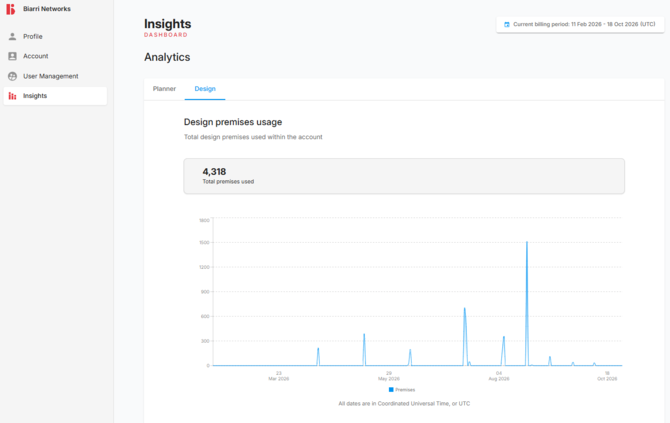
- Added Planner and Design tabs to the Insights page to switch between planner and design premises usage. This is visible to workspace Admins only.
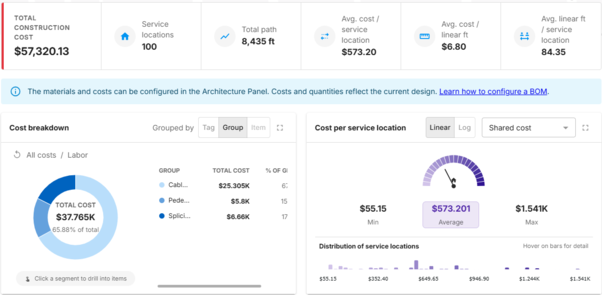
- An “interactive” Bill of Materials feature replaces the static BOM across all FOND project types. This new BOM includes callouts for key metrics (e.g. cost per passing, cost per foot) and dynamic charts to drill down into the cost of the network.
Fiber Design updates (Beta)
-
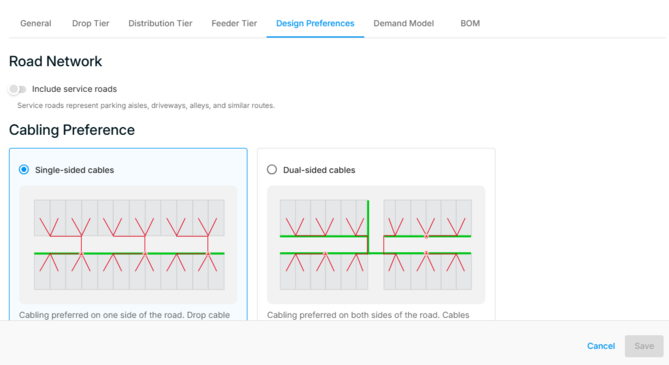
Data preparation settings for Fiber Design projects are now configured in the "Design Preferences" tab of the project architecture.
- Leadins will now be generated for pole data in the data preparation workflow. Poles will generally be preferred over underground points, when both are available to service an address.
- The design tool panel in Fiber Design projects no longer skips ahead to the next step when the Input Data or Data Prep steps are completed.
- Topological editing is now enabled by default when drawing base data (Modify data → Draw) in Fiber Design projects.
- Added a topological editing toggle to the polygon drawing toolbar (Parcels → Draw) and a polygon snap mode indicator similar to drawing points and linestrings.
- Fixed an issue where deleting a selected vertex on a linestring or polygon feature was deleting the entire feature. Now only the selected vertex will be deleted.
- Fixed an issue where the delete button in the toolbar was sometimes incorrectly disabled.
- Fixed an issue where the presence of null geometries would crash drawing operations.
- Fixed an issue where clicking a recently selected or deselected feature while editing could clear the selection instead of selecting it, requiring several clicks to select and edit line features such as leadins.
- Fixed an issue where area select would sometimes duplicate parcels/addresses.
October 5, 2026
Platform updates
-
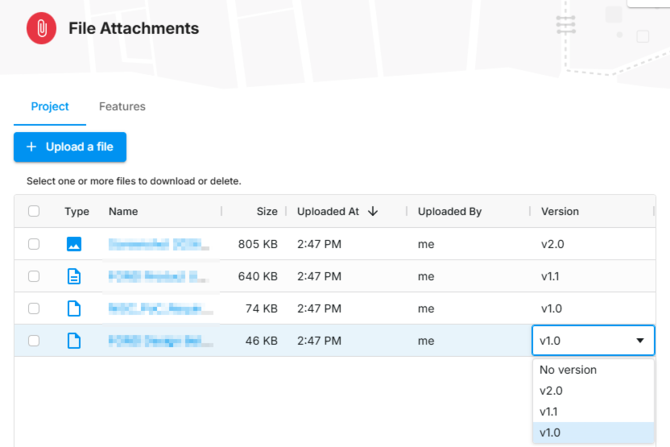
Project-level file attachments can now be tagged with a project Version. The version can be set when uploading files, and changed from the file list at any time. The version can be bulk updated across multiple files by selecting the files and then using the “Edit” button. It’s not a requirement to use versions.
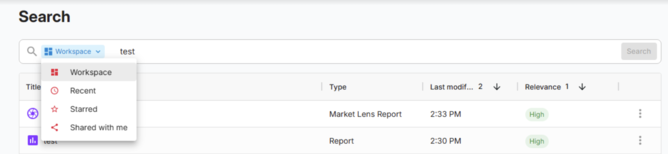
- A global search has been added to the topbar so that it can be accessed from any page. Your search scope can be adjusted, and the improved search page highlights the relevance of results and allows you to adjust your search term.
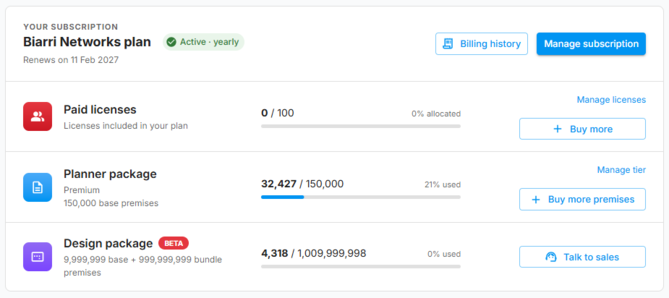
- Accounts with a design subscription can now track their premises from the homepage and the subscription management page. Available to workspace Admins only.
Fiber Planning updates
- The Market Lens boundary upload now accepts Shapefile, MapInfo TAB, KML and GeoJSON files.
Fiber Design updates (Beta)
- Construction prints generated from Design projects now have length labels for all underground and aerial installation routes.
Power Design updates (Beta)
-
Fixed issue in Power Design projects where the BOM was not able to be exported with Design completed.
September 21, 2026
Platform updates
-
All FOND BOM outputs will now be rounded to two decimal places for improved readability.
Fiber Planning updates
-
Fixed an issue where the Market Lens scoring inputs panel would not persist changes made if the back arrow is clicked.
Fiber Design updates (Beta)
- Parcels can now be imported separately from Addresses, via a dedicated option in the Input data menu. Parcels can be imported via Area Select, or you can upload your own parcel polygon layer. Parcel can now also be edited using FOND’s drawing tools.
- Added the ability to draw and modify aerial poles and spans within FOND Design -> Modify data, including the ability to connect leadins and underground path to poles.
- Blockers are now available to influence the design by defining paths where a cable cannot cross. Blockers can be drawn (or uploaded) from within the Design panel once a design has been generated. Use "Reset edits" to clear the Blockers layer.
- Design project construction prints now include feed direction lines indicating the direction of flow in the network.
Power Design updates (Beta)
-
Added 2-phase support to phase overrides.
September 7, 2026
Platform updates
- Currency configuration is available in the project-level settings (Project > Settings). It determines the currency symbol used to display within the BoM and the Cost to Serve output layers. This setting is available to all relevant project types, and both $ and £ are supported at this point in time.
- Both Currency and Unit of Measurement (Metric/m or Imperial/ft) can now be configured at the account level by administrators via fond.biarrinetworks.com/settings/account/defaults. Any new project created within the workspace will take on the default settings.
Fiber Planning updates
- Added a new option to report configurations to allow the user to select between one of two objectives:
- Maximize revenue: Prioritizes passing the addresses that generate the most revenue, regardless of build cost.
- Maximize profit: Prioritizes the network that delivers the best net return, weighing revenue against build cost.
- In Market Lens projects, an updated UI/UX allows users to more easily select which subareas to create plans for, by selecting them directly on the map.
Fiber Design updates (Beta)
- Improved the stability of the data preparation workflow, to avoid some errors encountered during customer testing.
- Made small improvements to crossing generation, particularly in areas with limited parcel data where few crossings were being created.
-
Improved detection of problematic street parcels, and parcels that are far away from the design area.
-
Added ability to add parcels to list to be removed in problematic parcels panel via delete or backspace button.
-
If you have already imported any datasets, they will now remain visible when using area select to import more data.
- Improved page layout for construction prints and implemented dynamic page continuation labels in support of this. Overall, this results in fewer pages per document, and fewer “empty” pages per document than before. We also fixed an issue where point labels could end up on an adjacent page.
Power Design updates (Beta)
-
Power Design users can now configure their own network architecture preferences, including transformer sizes and wire sizes. This includes support for 2-phase wires.
- Added parcel and address vector tile overlays to the map when drawing a boundary, providing visual context for boundary placement.
August 24, 2026
Platform updates
- Project file attachments are now ordered by newest to oldest, by default, to help project collaborators find the most relevant files more easily.
Fiber Design updates (Beta)
-
An “interactive” Bill of Materials feature replaces the static BOM for Design Beta customers. This new BOM includes callouts for key metrics (e.g. cost per passing, cost per foot) and dynamic charts to drill down into the cost of the network.
- A path preferencing tool has been added to FOND Design to allow users to easily change which side of the road is preferred for cables.
- Fixed bug where import streets would import addresses too.
- Added a lasso selection tool to all drawing toolbars. Users can now freehand-draw a selection area by clicking and dragging, in addition to the existing polygon (click-to-place-vertices) selection mode.
- Implemented the following improvements for construction prints (also applies to Power Design projects):
- Added street number labelling
- Added more detailed labelling for hubs and splices, including ID, Placement, Size, and Splitter type
- Added a BOM page
August 10, 2026
Platform updates
-
Feature counts shown on in the legend can now be copied straight to your clipboard by clicking on them.
- Fixed an issue where the unit of measurement setting wasn't applied until a page refresh; it now updates immediately.
Fiber Planning updates
-
For Market Lens projects:
- Improved loading performance for streets data, reducing risk of browser freezing up while loading the data.
- Updated the FCC data, reflecting the December 2025 dataset released on July 2026.
Fiber Design updates (Beta)
- A new "Custom Overlays" feature is available for Design Beta customers. This feature allows you to view layers from any Collaboration project within any other project type. Can be used for viewing common design reference datasets across multiple projects, such as existing utilities.
- Alongside automatic detection, problematic parcels (e.g. street parcels) can now also be manually selected and removed in the data-prep panel.
- Extended Design's "Modify data" step now offers a choice between drawing on the map or uploading base data.
- Addresses can now be edited at the same time as other layers.
- All layers begin as editable by default.
- Implemented the following improvements for construction prints (also applies to Power Design projects):
- Bumped the CAD paperspace scale from 1:500 to 1:1000 for clearer prints, suitable for 11 x 17 in (A3) print-outs.
- Reduced DXF size by using simplified halo around CAD print page continuation text.
Power Design updates (Beta)
-
Added a Phase dropdown when editing loop connections. The available options depend on the selected wire size:
-
ABC/X for 3x_1/0_Al,
-
A/B/C/X for 1/0_Al,
-
defaulting to X.
-
-
Added a "Transformer phase overrides" design control.
- Added default unit costs in the Power Design project BOM, so that approximate costs can be viewed in the BOM output.
- Fixed issue where creating a new project version based on a previous version didn't work properly. In combination with the addition of costs to the BOM, this means that users can now create multiple design scenarios, and compare BOMs and costs side by side.
- Improved flow for importing input data within a boundary. The UI will now redirect you back to the Input Data step after you have clicked “Import”.
- Previously, most steps of the power design project would close after you completed an action, opening up the next step in the workflow. Now you will no longer be immediately skipped to the next step, giving you the opportunity to continue editing input data, design overrides, etc.
July 20, 2026
Platform updates
-
Fixed an issue where a user could get into a state where they were unable to access any FOND content after being removed from an account. Users will now be redirected straight to the account selector instead of getting stuck.
- Role badges (Admin, Member, Guest, and External) are now consistently presented across the account management page, switch account menu, share modal, and user management list. See also: fondhelp.biarrinetworks.com/account-roles-and-permissions.
- A number of FOND modals (e.g. Architecture & BOM configuration) now have a “full screen” option for improved visibility on small screens.
Fiber Planning updates
-
Updates for Market Lens projects:
- A new “All Fiber Provider Coverage” overlay shows every fiber provider active in the current map view, giving a fuller picture of the competitive landscape without needing to turn on providers one by one.
- The subareas list in the work area step has been simplified, removing clutter so it's quicker to review and move on
- Address-count labels on subareas now always display correctly
- Fixed a bug where subarea checkboxes were not displayed correctly in the Plan step.
Fiber Design updates (Beta)
-
Design projects now default to a “balanced” design quality setting, giving a sensible mix of speed and design optimisation.
- Drop assignments can now be edited in FOND Design projects. This leverages “special service” and some neat UX to make the editing process smooth and with real-time validations - see the example video.
- A new “Review problematic parcels” flow in the data-prep panel helps identify and remove parcels that are likely to cause issues (such as street parcels) before they affect a design. See the example video.
- Implemented the following improvements for construction prints (also applies to Power Design projects):
- Added street name labels
- Added parcel lot lines
- Improved page continuation labels (e.g. “See page B2”)
Power Design updates (Beta)
-
Loop connections can now be added for Power Design projects.
- Power Design projects containing multiple versions can now view all project BOMs side-by-side, making it much faster to spot differences and choose the best option.
June 15, 2026
Platform updates
- Users can be invited to an organisation's workspace as an Admin, Member, or Guest. The term “External” is now used for accounts where you have viewer/collaborator access to shared projects, but where you are not actually invited to the account.
- When you select colocated features on the map, the feature popup will now
- Have the features list organised according to the legend layout (useful when the same layer name is duplicated between groups)
- Display a list of up to 200 features
- Contain a search box to help filter features in the list
Fiber Planning updates
-
Address and Street based data can now be viewed on the map of Market Lens projects as overlays.
- Addresses: In lieu of the highly requested CostQuest data, the addition of FOND's address data to the map (categorised by address type) is intended to provide visual insight into market areas and more confidence that the other overlay statistics are backed by real data.
- Streets: Categorised by street type, this data can help users to identify jurisdiction boundaries and permitting risks earlier in the market finding process.
Fiber & Power Design updates (Beta)
-
Input data drawing tools improvements
-
Now supports editing of UG & Leadins simultaneously rather than one layer at a time. This includes topological editing.
-
Keyboard shortcuts for undo, redo, delete
- Better snapping behaviour: Snap priority for points, preview snapping before drawing
- Last-used drawing tool remains active
- Right click can now be used to complete a line (in addition to double-click)
- Linestrings can be extended by drawing now vertices with ALT+Click
-
- Construction print pages now have alpha-numeric numbering (A1,A2,...,B1,B2,...)
May 18, 2026
Platform updates
- We have added better support for users in multiple accounts. This is intended to make it easier for users working across organisations to switch between FOND workspaces.
- Accounts logos can now have a custom colour or image for easier recognition.
Power Design updates (Beta)
The very first version of the Power Design project is available for Beta customers.
This project type includes:
- Data preparation workflow including leadins and dual sided generation
- Data editing tools with real time validations
- Power design output
- Design controls including blockers, hubs, footprints, and overrides
- Construction print exports
Product updates prior to May 18, 2026 are not contained within this article