![biarri-networks-logo.png]](https://fondhelp.biarrinetworks.com/hs-fs/hubfs/biarri-networks-logo.png?height=40&name=biarri-networks-logo.png)
Common problems
| Problem | Likely cause | Fix |
|---|---|---|
| Configure report is greyed out | The plan or design isn’t complete, or has changed since you generated it | Generate or update the design |
| No seat, no Fiber Planner or Fiber Design, or not enough access | Ask your workspace admin for a seat, or a project Manager for Contributor access | |
| Missing demand model | The architecture has no Demand Model | Add one to the architecture, then re-run the design |
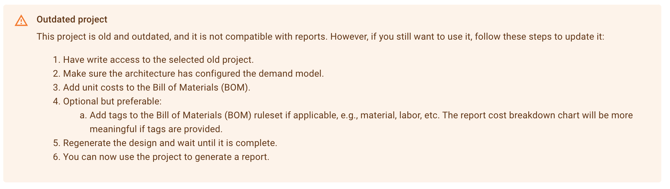
| Outdated project | The design was made with older tools | See instructions in the next section |
| Undefined bill of materials or No costs within bill of materials | The BOM is missing, or has no unit costs | Add costs in your architecture’s BOM tab, then click Update BOM |
| Report generation failed | Usually a mismatch between your revenue settings and Demand Model | Check that every address type has a revenue row, the default type has revenue, and every minimum take rate is lower than its maximum. Then click Try again. If it still fails, contact support. |
| Nothing is built | Your resource limits or revenue are too low to make building worthwhile | Raise your build limits or budget, check ARPU and take rates, or try Maximize revenue |
| Everything is built in the first phase | Your limits are high enough to build the whole network at once | Lower your resource limits to model a realistic build rate |
| Negative NPV | Costs outweigh revenue within the planning period | Check your BOM costs and revenue assumptions, extend the planning period, or add a horizon value |
| Results have disappeared | A setting was changed | Regenerate the report |
Get reports running on an "old project"
If you are encountering an 'Outdated project' warning message, it is recommended to create a new version of the project, ensure that it has an architecture with a demand model and a BOM with costs, and re-run the design.