![biarri-networks-logo.png]](https://fondhelp.biarrinetworks.com/hs-fs/hubfs/biarri-networks-logo.png?height=40&name=biarri-networks-logo.png)
Every address in a fiber project needs to know two things: how many fibers it should get, and which tier of the network they should come from. A single-family home might need one drop fiber, while a large apartment building or a hospital is better served directly from further up the network.
You don’t set these values on each address. Instead:
- Each address has an AddressType, such as SFU for a single-family home or LMDU for a large apartment building.
- The Demand Model in your architecture sets the tier and number of fibers for each address type.
- FOND applies the Demand Model to every address when it generates your plan or design.
To change how an address is served, change its AddressType or change the Demand Model. You can’t edit the tier or the number of fibers on an individual address.
This applies to Fiber Planner and Fiber Design projects.
Where to find the Demand Model
The Demand Model is part of your architecture. You set it up straight after the network architecture settings.
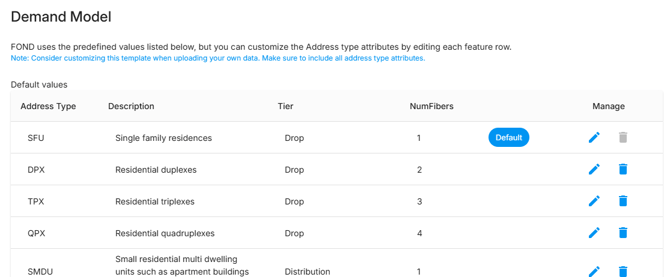
Demand Model settings
Each row in the Demand Model is a fiber allocation for one address type:
| Setting | What it does |
|---|---|
| Address Type | The value in the address’s AddressType field that this row applies to |
| Description | A short note on what kind of address this is, to help you and your team |
| Tier | The tier the fibers come from: Drop, Distribution or Feeder |
| NumFibers | How many fibers to provide, as a whole number of 0 or more. 0 means the address isn’t served. |
| Default |
Applies this row to any address whose type isn’t in the Demand Model. You can have only one default, and it can’t be deleted.
|
| Exclude type |
Leaves addresses of this type out of the plan or design completely
|


Unserved addresses
Addresses with NumFibers set to 0, and addresses of an exluded type, aren’t served. They don’t count toward your subscription’s premises.
Address types that aren’t in the Demand Model
If an address has a type that isn’t in the Demand Model, FOND tells you which type is missing and applies the default row to those addresses. If that’s not what you want, add a row for the missing type.
Which tier should I use?
As a general rule, the larger the address, the further up the network it should be served from.
| Tier | What FOND builds at the address | Typical address types |
|---|---|---|
Drop |
A service location served by drop cables, one per fiber. Fibers are split at both the distribution and drop tiers. |
Homes, duplexes, small businesses |
|
Distribution |
A drop dedicated hub, served by a distribution cable (or a drop hub tail cable in connectorized architectures). |
Small and medium apartment buildings, medium commercial buildings |
|
Distribution + bypass splitters |
A drop unsplit hub, served by a distribution cable. |
Large apartment complexes, large commercial sites, institutions |
|
Feeder |
A distribution dedicated hub, served by a feeder cable. |


As you can see, an address type classified using Distribution + bypass splitters and one with Feeder will receive the same fiber capacity. The difference between the two is the device placed at the address location and the cable feeding it.
How many fibers?
For addresses served from the Distribution or Feeder tier, work out the number of fibers from the number of units the address contains (X):
- Distribution tier: fibers = X ÷ drop split ratio, rounded up. For example, with a 1:4 drop split, 6 fibers serve up to 24 units.
- Feeder tier: fibers = X ÷ overall split ratio, rounded up. For example, with a 1:32 overall split, 8 fibers serve up to 256 units.
- Distribution bypass splitters: Use the same method as an address served by the Feeder tier.
The standard Demand Model
New architectures start with a standard Demand Model, which you can change to suit your network. It is always recommended that you revise this to be suitable for your architecture.
| Address Type | Description | Examples | Tier | NumFibers |
|---|---|---|---|---|
| SFU | Single-family residence | Single-family homes | Drop | 1 |
| DPX | Residential duplex | Two-family residences | Drop | 2 |
| TPX | Residential triplex | Three-family residences | Drop | 3 |
| QPX | Residential quadplex | Four-family residences | Drop | 4 |
| SMDU | Small multi-dwelling unit (5–9 units) | Apartment buildings | Distribution | 1 |
| MMDU | Medium multi-dwelling unit (10–99 units) | Apartment buildings | Distribution | 2 |
| LMDU | Large multi-dwelling unit (100+ units) | Apartment complexes | Feeder | 2 |
| SCU | Small commercial unit | Retail stores, offices, farms | Drop | 1 |
| MCU | Medium commercial unit | Office buildings, hotels, medical clinics | Distribution | 1 |
| LCU | Large commercial unit | Shopping malls, multi-story offices, arenas | Feeder | 1 |
| INSTITUTION | High-bandwidth facilities | Schools, colleges, hospitals, museums | Feeder | 1 |
| GOVT | Government offices and facilities | Administration offices, military sites | Distribution | 1 |
| PUBLIC | Public buildings | Community centers, municipal facilities | Drop | 1 |
| DNS | Do not serve | Vacant, exempt or forest land | - | - |
The SFU Address Type is also the Default treatment for addresses with a type that does not match any of the above values.
Addresses that are already classified
Addresses you import with Area Select already have an AddressType from the table above. FOND classifies them mainly by the parcel’s land use. That means the standard Demand Model works straight away, with no extra setup.
Area Select classifications are a starting point. It’s worth checking them, especially for large or buildings or parcels.
Using your own address data
If you upload your own addresses, add an AddressType field (text) and fill it in with the types in your Demand Model. Addresses with no AddressType, or with a type that isn’t in the Demand Model, get the default allocation.