![biarri-networks-logo.png]](https://fondhelp.biarrinetworks.com/hs-fs/hubfs/biarri-networks-logo.png?height=40&name=biarri-networks-logo.png)
Input data is the geographic (GIS) information you give FOND about your project area. FOND uses it to answer two questions:
- Where does the network need to reach? These are the addresses to be served.
- Where can cables and equipment go? These are the paths, poles and other places where the network can be built.
You can import input data with Area Select, upload your own files, or draw it with the drawing tools.
Input data layers
Which layers you need, and what some of them are called, depends on the project type.
Addresses |
Geometry type: Point The locations that need service. In fiber projects, you can control how much fiber each address gets with the address type and the Demand Model. See How to control fiber allocation in FOND. |
Parcels
|
Geometry type: Polygon The boundaries of land lots. FOND uses parcels to generate other layers, such as underground path, leadins and service area boundaries. |
Streets |
Geometry type: Linestring Road centerlines. FOND uses streets to generate other layers, such as underground path, aerial spans and service area boundaries. |
Underground path |
Geometry type: Linestring Every place where underground cables could be placed when FOND generates the plan or design. |
Underground points |
Geometry type: Point Every place where underground equipment could be placed when FOND generates the plan or design. |
Aerial spans |
Geometry type: Linestring Every place where aerial cables could be placed. Spans show where cable can be hung between poles, whether on an existing aerial network or a proposed one. |
Poles |
Geometry type: Point Every place where aerial equipment could be placed. Poles represent the aerial infrastructure where equipment and cables can be attached. |
Leadins
|
Geometry type: Linestring The approximate service path from the main network to each address. |
Central offices / Sources |
Geometry type: Point The points that feed the network, such as a central office, a distribution cabinet, or a tie-in to an existing network. you may either:
|


Which layers do you need?
For most project types, FOND requires either
- Addresses + Underground path + Underground points*, or
- Addresses + Aerial spans + Poles.
in order to form a candidate network.
*Not required for Fiber Planner.
FOND can generate some layers for you
You don’t always need to provide every layer yourself. If you have addresses and parcels and streets, FOND can generate most things that it needs:
- Underground path and points can be generated from a combination of streets and parcels
- Aerial spans and poles can be generated from streets
- Leadins can be generated from a combination of addresses and underground path and parcels
How FOND uses input data
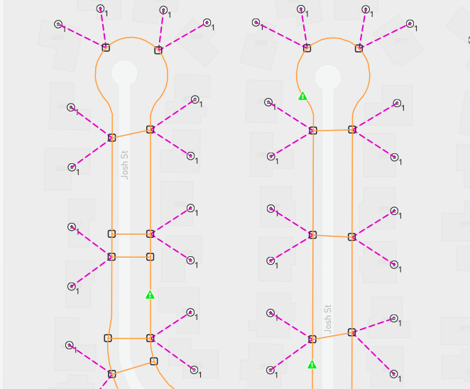
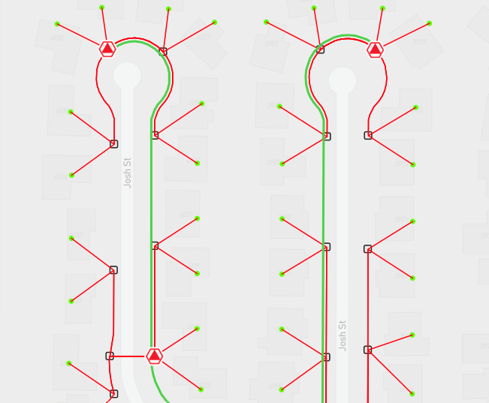
FOND combines all your path and infrastructure layers into a candidate network: every place where cables and equipment could go. When it generates your plan or design, FOND places cables and equipment on the candidate network, using only the parts it needs to serve every address as efficiently as possible.
For example, the first image shows the underground path, points, and leadins in a project, which is the candidate network. The second shows the same area after FOND generated the network. Cables and equipment follow the candidate network, but only where they’re needed.
 |
 |